Table 表格
介绍
用于展示多条结构类似的数据。
TIP
阅读该组件文档前请确保已认真阅读快速上手章节的每一个字。
引入
ts
import { IBestTable, IBestTableColumn, IBestTableColumnData } from "@ibestservices/ibest-ui";代码演示
基础用法

TIP
tableId 为必传字段, 需保证全局唯一性。
点我查看代码
ts
interface TableData{
  date: string
  name: string
  desc: string
}
@Entry
@Component
struct DemoPage {
  @State tableId: string = "table"
  @State data: TableData[] = []
  aboutToAppear() {
		setTimeout(() => {
      // 模拟请求数据
      this.data = [
        { date: '2025-03-10', name: 'IBest-UI', desc: '一个轻量、简单易用、可定制主题、支持深色模式和浅色模式的鸿蒙开源UI组件库。' },
        { date: '2025-03-09', name: 'IBest-UI', desc: '一个轻量、简单易用、可定制主题、支持深色模式和浅色模式的鸿蒙开源UI组件库。' },
        { date: '2025-03-08', name: 'IBest-UI', desc: '一个轻量、简单易用、可定制主题、支持深色模式和浅色模式的鸿蒙开源UI组件库。' }
      ]
    }, 1000)
	}
  build() {
    Column(){
      IBestTable({ tableId: this.tableId, data: this.data }){
        IBestTableColumn({ tableId: this.tableId, title: "日期", prop: "date", cellWidth: 100 })
        IBestTableColumn({ tableId: this.tableId, title: "名称", prop: "name", cellWidth: 70 })
        IBestTableColumn({ tableId: this.tableId, title: "描述", prop: "desc" })
      }
    }
  }
}
斑马纹

点我查看代码
ts
interface TableData{
  date: string
  name: string
  desc: string
}
@Entry
@Component
struct DemoPage {
  @State tableId: string = "table"
  @State data: TableData[] = [
    { date: '2025-03-10', name: 'IBest-UI', desc: '一个轻量、简单易用、可定制主题、支持深色模式和浅色模式的鸿蒙开源UI组件库。' },
    { date: '2025-03-09', name: 'IBest-UI', desc: '一个轻量、简单易用、可定制主题、支持深色模式和浅色模式的鸿蒙开源UI组件库。' },
    { date: '2025-03-08', name: 'IBest-UI', desc: '一个轻量、简单易用、可定制主题、支持深色模式和浅色模式的鸿蒙开源UI组件库。' }
  ]
  build() {
    Column(){
      IBestTable({ tableId: this.tableId, data: this.data, stripe: true }){
        IBestTableColumn({ tableId: this.tableId, title: "日期", prop: "date", cellWidth: 100 })
        IBestTableColumn({ tableId: this.tableId, title: "名称", prop: "name", cellWidth: 70 })
        IBestTableColumn({ tableId: this.tableId, title: "描述", prop: "desc" })
      }
    }
  }
}
边框

点我查看代码
ts
interface TableData{
  date: string
  name: string
  desc: string
}
@Entry
@Component
struct DemoPage {
  @State tableId: string = "table"
  @State data: TableData[] = [
    { date: '2025-03-10', name: 'IBest-UI', desc: '一个轻量、简单易用、可定制主题、支持深色模式和浅色模式的鸿蒙开源UI组件库。' },
    { date: '2025-03-09', name: 'IBest-UI', desc: '一个轻量、简单易用、可定制主题、支持深色模式和浅色模式的鸿蒙开源UI组件库。' },
    { date: '2025-03-08', name: 'IBest-UI', desc: '一个轻量、简单易用、可定制主题、支持深色模式和浅色模式的鸿蒙开源UI组件库。' }
  ]
  build() {
    Column(){
      IBestTable({ tableId: this.tableId, data: this.data, showBorder: true }){
        IBestTableColumn({ tableId: this.tableId, title: "日期", prop: "date", cellWidth: 100 })
        IBestTableColumn({ tableId: this.tableId, title: "名称", prop: "name", cellWidth: 70 })
        IBestTableColumn({ tableId: this.tableId, title: "描述", prop: "desc" })
      }
    }
  }
}
固定列和表头

点我查看代码
ts
interface TableData{
  date: string
  name: string
  desc: string
}
@Entry
@Component
struct DemoPage {
  @State tableId: string = "table"
  @State data: TableData[] = [
    { date: '2025-03-10', name: 'IBest-UI', desc: '一个轻量、简单易用、可定制主题、支持深色模式和浅色模式的鸿蒙开源UI组件库。' },
    { date: '2025-03-09', name: 'IBest-UI', desc: '一个轻量、简单易用、可定制主题、支持深色模式和浅色模式的鸿蒙开源UI组件库。' },
    { date: '2025-03-08', name: 'IBest-UI', desc: '一个轻量、简单易用、可定制主题、支持深色模式和浅色模式的鸿蒙开源UI组件库。' }
  ]
  build() {
    Column(){
      IBestTable({ tableId: this.tableId, data: this.data1, fixHeight: 140 }){
        IBestTableColumn({ tableId: this.tableId, title: "日期", prop: "date", fixed: true, cellWidth: 100 })
        IBestTableColumn({ tableId: this.tableId, title: "名称", prop: "name", cellWidth: 70 })
        IBestTableColumn({ tableId: this.tableId, title: "描述", prop: "desc", cellWidth: 500 })
      }
    }
  }
}
动态显示列

点我查看代码
ts
import { IBestButton } from '@ibestservices/ibest-ui';

interface TableData{
  date: string
  name: string
  desc: string
}
@Entry
@Component
struct DemoPage {
  @State tableId: string = "table"
  @State showDate: boolean = true
  @State data: TableData[] = [
    { date: '2025-03-10', name: 'IBest-UI', desc: '一个轻量、简单易用、可定制主题、支持深色模式和浅色模式的鸿蒙开源UI组件库。' },
    { date: '2025-03-09', name: 'IBest-UI', desc: '一个轻量、简单易用、可定制主题、支持深色模式和浅色模式的鸿蒙开源UI组件库。' },
    { date: '2025-03-08', name: 'IBest-UI', desc: '一个轻量、简单易用、可定制主题、支持深色模式和浅色模式的鸿蒙开源UI组件库。' }
  ]
  build() {
    Column({space: 20}){
      IBestButton({
        type: "primary",
        text: "切换日期列显示",
        onBtnClick: () => {
          this.showDate = !this.showDate
        }
      })
      IBestTable({ tableId: this.tableId, data: this.data }){
        IBestTableColumn({ tableId: this.tableId, title: "日期", prop: "date", cellWidth: 100, show: this.showDate })
        IBestTableColumn({ tableId: this.tableId, title: "名称", prop: "name", cellWidth: 70 })
        IBestTableColumn({ tableId: this.tableId, title: "描述", prop: "desc" })
      }
    }
  }
}
格式化单元格内容

点我查看代码
ts
interface TableData{
  date: string
  name: string
  desc: string
}
@Entry
@Component
struct DemoPage {
  @State tableId: string = "table"
  @State data: TableData[] = [
    { date: '2025-03-10', name: 'IBest-UI', desc: '一个轻量、简单易用、可定制主题、支持深色模式和浅色模式的鸿蒙开源UI组件库。' },
    { date: '2025-03-09', name: 'IBest-UI', desc: '一个轻量、简单易用、可定制主题、支持深色模式和浅色模式的鸿蒙开源UI组件库。' },
    { date: '2025-03-08', name: 'IBest-UI', desc: '一个轻量、简单易用、可定制主题、支持深色模式和浅色模式的鸿蒙开源UI组件库。' }
  ]
  formatDate(row: TableData, column: IBestTableColumnData, rowIndex: number, columnIndex: number){
    console.log("formatDate", JSON.stringify(row), JSON.stringify(column), rowIndex, columnIndex)
    return row.date.replaceAll('-', '/')
  }
  build() {
    Column(){
      IBestTable({ tableId: this.tableId, data: this.data }){
        IBestTableColumn({
          tableId: this.tableId,
          title: "日期",
          prop: "date",
          cellWidth: 100,
          formatter: (row: TableData, column, rowIndex, columnIndex): string => this.formatDate(row, column, rowIndex, columnIndex)
        })
        IBestTableColumn({ tableId: this.tableId, title: "名称", prop: "name", cellWidth: 70 })
        IBestTableColumn({ tableId: this.tableId, title: "描述", prop: "desc" })
      }
    }
  }
}
自定义单元格内容

点我查看代码
ts
import { IBestToast } from '@ibestservices/ibest-ui';

interface TableData{
  date: string
  name: string
  desc: string
}
@Entry
@Component
struct DemoPage {
  @State tableId: string = "table"
  @State data: TableData[] = [
    { date: '2025-03-10', name: 'IBest-UI', desc: '一个轻量、简单易用、可定制主题、支持深色模式和浅色模式的鸿蒙开源UI组件库。' },
    { date: '2025-03-09', name: 'IBest-UI', desc: '一个轻量、简单易用、可定制主题、支持深色模式和浅色模式的鸿蒙开源UI组件库。' },
    { date: '2025-03-08', name: 'IBest-UI', desc: '一个轻量、简单易用、可定制主题、支持深色模式和浅色模式的鸿蒙开源UI组件库。' }
  ]
  @Builder headerBuilder(column: IBestTableColumnData, columnIndex: number){
    Row({space: 12}){
      Text(column.title).fontSize(14)
      IBestIcon({
        name: "question-o",
        iconSize: 14
      })
    }
  }
  @Builder customCell(row: TableData, column: IBestTableColumnData, rowIndex: number, columnIndex: number){
    if(column.prop == 'date'){
      Row({space: 12}){
        IBestIcon({
          name: "underway-o",
          iconSize: 14
        })
        Text(row.date).fontSize(14)
      }
    }else{
      IBestButton({
        type: "primary",
        text: "操作",
        onBtnClick: () => {
          IBestToast.show(`当前点击的行数据为${row.date} ${row.name}`)
        }
      })
    }
  }

  build() {
    Column(){
      IBestTable({ tableId: this.tableId, data: this.data }){
        IBestTableColumn({
          tableId: this.tableId,
          title: "日期",
          prop: "date",
          cellWidth: 130,
          cellBuilder: (row: TableData, column: IBestTableColumnData, rowIndex: number, columnIndex: number): void => this.customCell(row, column, rowIndex, columnIndex)
        })
        IBestTableColumn({ tableId: this.tableId, title: "名称", prop: "name" })
        IBestTableColumn({
          tableId: this.tableId,
          title: "操作",
          cellWidth: 90,
          headerBuilder: (column: IBestTableColumnData, columnIndex: number): void => this.headerBuilder(column, columnIndex),
          cellBuilder: (row: TableData, column: IBestTableColumnData, rowIndex: number, columnIndex: number): void => this.customCell(row, column, rowIndex, columnIndex)
        })
      }
    }
  }
}
表尾合计行

点我查看代码
ts
interface TableData{
  name: string
  amount1: number
  amount2: number
  amount3: number
  amount4: number
  amount5: number
}
@Entry
@Component
struct DemoPage {
  @State tableId: string = "table"
  @State data: TableData[] = [
    { name: "数据1", amount1: 100, amount2: 98.6, amount3: 87.5, amount4: 98.6, amount5: 94.2 },
    { name: "数据2", amount1: 68.8, amount2: 100, amount3: 96.6, amount4: 76.5, amount5: 77.4 },
    { name: "数据3", amount1: 98.5, amount2: 87.4, amount3: 86.9, amount4: 87.3, amount5: 76.4 },
    { name: "数据4", amount1: 87, amount2: 97, amount3: 78.8, amount4: 76.3, amount5: 98.54 },
    { name: "数据5", amount1: 88, amount2: 97, amount3: 85.9, amount4: 68.3, amount5: 76.9 }
  ]
  build() {
    Column(){
      IBestTable({ tableId: this.tableId, data: this.data, showSummary: true }){
        IBestTableColumn({ tableId: this.tableId, title: "名称", prop: "name", cellWidth: 70, fixed: true })
        IBestTableColumn({ tableId: this.tableId, title: "Amount1", prop: "amount1", cellWidth: 100 })
        IBestTableColumn({ tableId: this.tableId, title: "Amount2", prop: "amount2", cellWidth: 100 })
        IBestTableColumn({ tableId: this.tableId, title: "Amount3", prop: "amount3", cellWidth: 100 })
        IBestTableColumn({ tableId: this.tableId, title: "Amount4", prop: "amount4", cellWidth: 100 })
        IBestTableColumn({ tableId: this.tableId, title: "Amount5", prop: "amount5", cellWidth: 100, fixed: "right" })
      }
    }
  }
}
合并行列+固定列
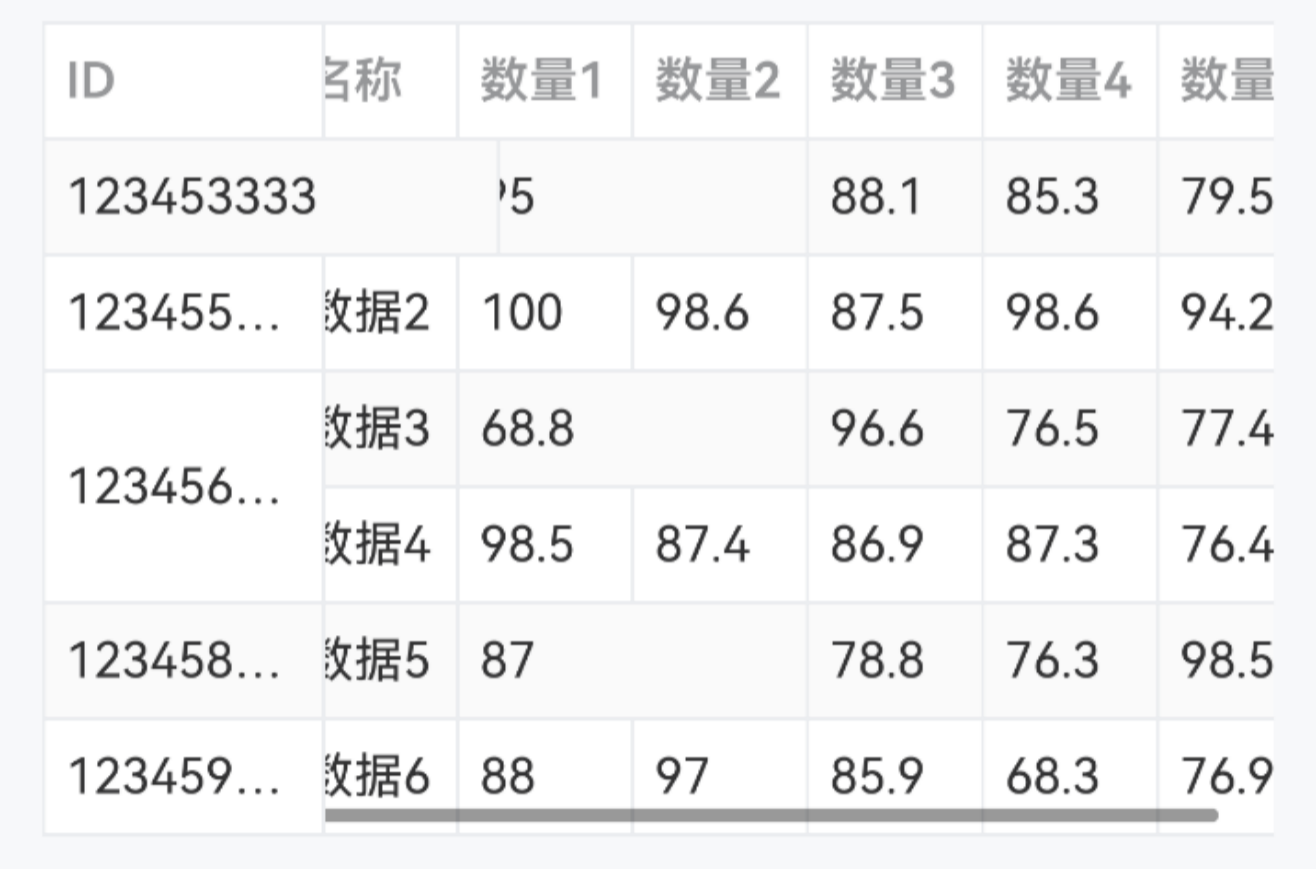
TIP
传入 spanMethod 方法即可实现行列合并,需注意以下几点。
· spanMethod 方法返回值为数组,第一项表示当前单元格所占的行数,第二项表示当前单元格所占的列数(例[1,2]表示当前单元格占1行2列);
· 合并规则:例如合并第一行第一列和第二列,则第一行第一列返回[1,2],第一行第二列需返回[0,0];
· 方法的参数有四个,依次为当前行 row、当前列 column、当前行索引 rowIndex、当前列索引 columnIndex。
点我查看代码
ts
interface TableData{
  id: string
  name: string
  amount1: number
  amount2: number
  amount3: number
  amount4: number
  amount5: number
}
@Entry
@Component
struct DemoPage {
  @State tableId: string = "table"
  @State data: TableData[] = [
    { id: "123453333", name: "数据1", amount1: 95, amount2: 93.2, amount3: 88.1, amount4: 85.3, amount5: 79.5 },
    { id: "123455555", name: "数据2", amount1: 100, amount2: 98.6, amount3: 87.5, amount4: 98.6, amount5: 94.2 },
    { id: "123456666", name: "数据3", amount1: 68.8, amount2: 100, amount3: 96.6, amount4: 76.5, amount5: 77.4 },
    { id: "123457777", name: "数据4", amount1: 98.5, amount2: 87.4, amount3: 86.9, amount4: 87.3, amount5: 76.4 },
    { id: "123458888", name: "数据5", amount1: 87, amount2: 97, amount3: 78.8, amount4: 76.3, amount5: 98.54 },
    { id: "123459999", name: "数据6", amount1: 88, amount2: 97, amount3: 85.9, amount4: 68.3, amount5: 76.9 }
  ]
  arraySpanMethod(row: TableData, column: IBestTableColumnData, rowIndex: number, columnIndex: number) {
    // 合并第一行的第一列和第二列
    if (rowIndex === 0) {
      if (columnIndex === 0) {
        return [1, 2]
      } else if (columnIndex === 1) {
        return [0, 0]
      }
    }
    // 合并第一列的第三行和第四行
    if (columnIndex === 0) {
      if (rowIndex === 2) {
        return [2,1]
      }else if (rowIndex === 3){
        return [0, 0]
      }
    }
    // 合并偶数行的第三列和第四列
    if (rowIndex % 2 === 0) {
      if (columnIndex === 2) {
        return [1, 2]
      } else if (columnIndex === 3) {
        return [0, 0]
      }
    }
    return [1, 1]
  }
  build() {
    Column(){
      IBestTable({ tableId: this.tableId, data: this.data, stripe: true, showBorder: true, spanMethod: this.arraySpanMethod}){
        IBestTableColumn({ tableId: this.tableId, title: "ID", prop: "id", cellWidth: 80, fixed: true })
        IBestTableColumn({ tableId: this.tableId, title: "名称", prop: "name", cellWidth: 50 })
        IBestTableColumn({ tableId: this.tableId, title: "数量1", prop: "amount1", cellWidth: 50 })
        IBestTableColumn({ tableId: this.tableId, title: "数量2", prop: "amount2", cellWidth: 50 })
        IBestTableColumn({ tableId: this.tableId, title: "数量3", prop: "amount3", cellWidth: 50 })
        IBestTableColumn({ tableId: this.tableId, title: "数量4", prop: "amount4", cellWidth: 50 })
        IBestTableColumn({ tableId: this.tableId, title: "数量5", prop: "amount5", cellWidth: 50 })
      }
    }
  }
}
动态修改数据
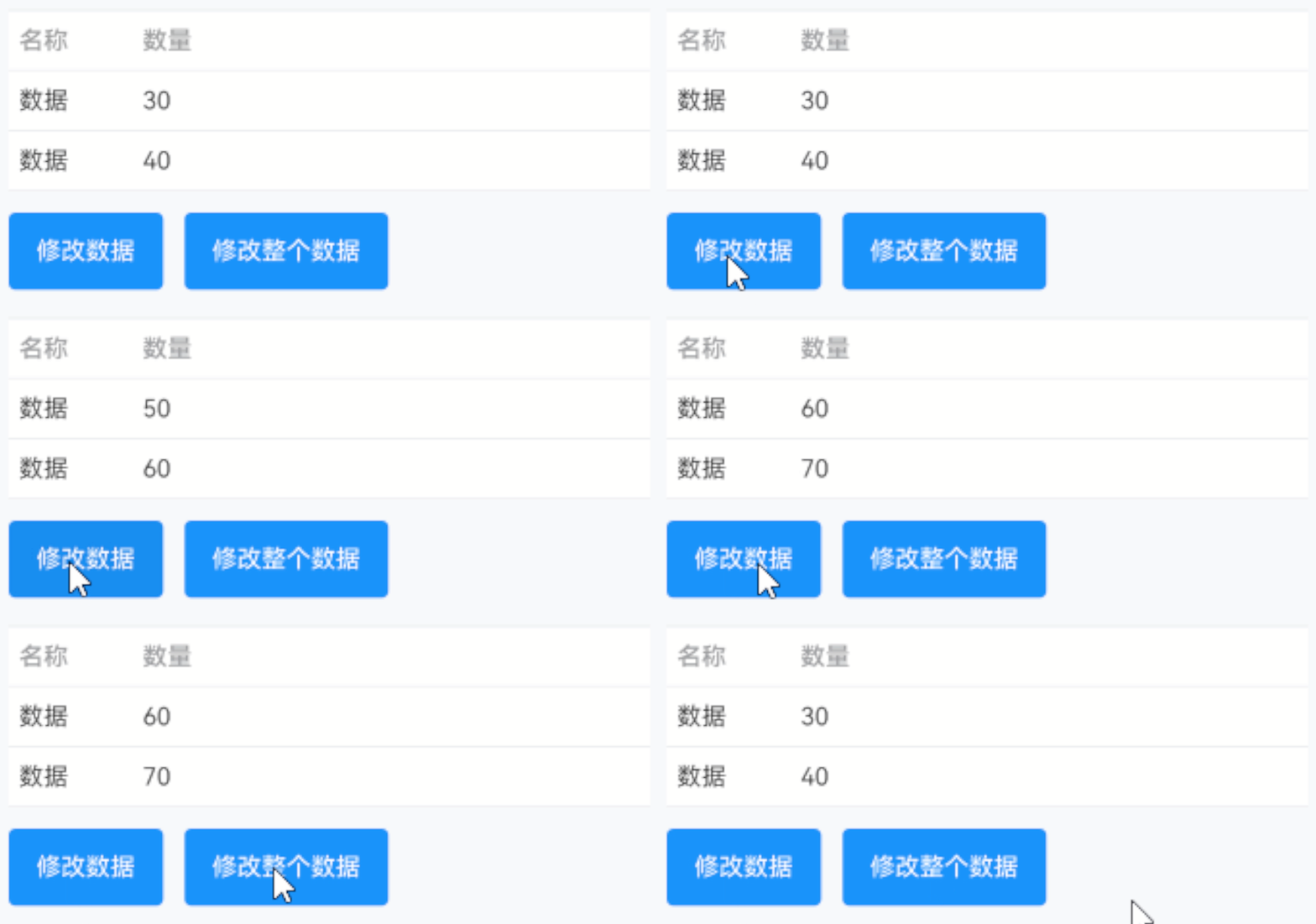
TIP
动态修改数据分两种情况:
· 无需修改表格某行某列数据,可直接为data属性赋值普通数据,参考基础用法;
· 还需修改表格某行某列数据,需要借助makeObserved方法,参考以下代码事例。
点我查看代码
ts
import { UIUtils } from '@kit.ArkUI'
class TableData{
  name: string = ""
  number: number = 0
  constructor(name: string, number: number) {
    this.name = name
    this.number = number
  }
}
@Entry
@Component
struct DemoPage {
  @State tableId: string = "table"
  @State data: TableData[] = []
  aboutToAppear() {
		setTimeout(() => {
      // 模拟请求数据
      this.data = [
        UIUtils.makeObserved(new TableData("数据1", 10)),
        UIUtils.makeObserved(new TableData("数据2", 20))
      ]
    }, 1000)
	}
  build() {
    Column({space: 20}){
      IBestTable({ tableId: this.tableId, data: this.data }){
        IBestTableColumn({ tableId: this.tableId, title: "名称", prop: "name", cellWidth: 100 })
        IBestTableColumn({ tableId: this.tableId, title: "数量", prop: "number"})
      }
      Row({space: 20}){
        IBestButton({
          type: "primary",
          text: "修改数量",
          onBtnClick: () => {
            this.data[0].number += 10
          }
        })
        IBestButton({
          type: "primary",
          text: "修改整个数据",
          onBtnClick: () => {
            this.data = [
              UIUtils.makeObserved(new TableData2("数据3", 30)),
              UIUtils.makeObserved(new TableData2("数据4", 40))
            ]
          }
        })
      }
    }
  }
}
多级表头+固定列 2.2.6
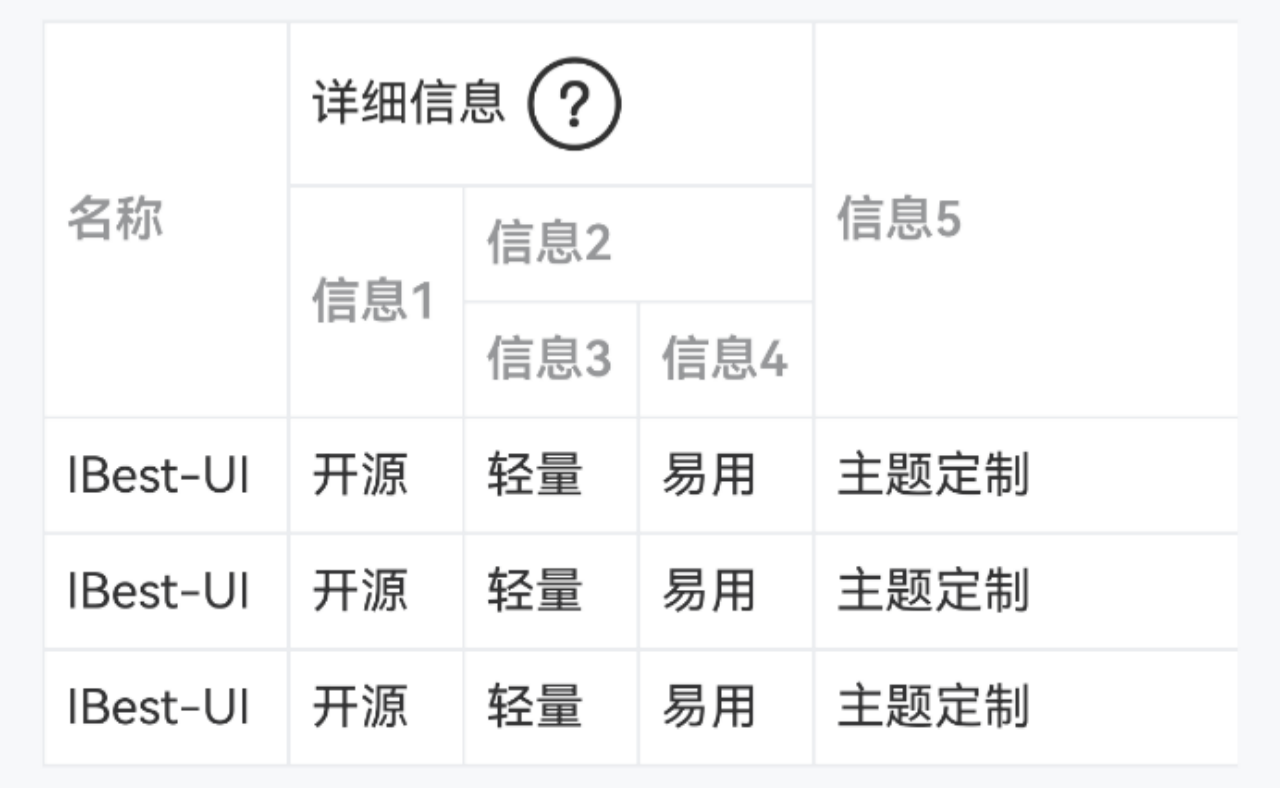
TIP
通过设置 parentProp 属性,可实现将当前列的表头置于对应属性名的表头下。
点我查看代码
ts
interface TableData{
	name: string
	info1: string
	info3: string
	info4: string
	info5: string
}
@Entry
@Component
struct DemoPage {
  @State tableId: string = "table"
  @State data: TableData[] = [
		{ name: 'IBest-UI', info1: '开源', info3: '轻量', info4: "易用", info5: "主题定制" },
		{ name: 'IBest-UI', info1: '开源', info3: '轻量', info4: "易用", info5: "主题定制" },
		{ name: 'IBest-UI', info1: '开源', info3: '轻量', info4: "易用", info5: "主题定制" }
	]
  build() {
    Column(){
      IBestTable({ tableId: this.tableId, data: this.data }){
        IBestTableColumn({ tableId: this.tableId, title: "名称", prop: "name", cellWidth: 70, fixed: true })
        IBestTableColumn({
          tableId: this.tableId,
          title: "详细信息",
          prop: "detail",
          cellWidth: 150,
          headerBuilder: (column: IBestTableColumnData, columnIndex: number): void => this.headerBuilder(column, columnIndex)
        })
        IBestTableColumn({ tableId: this.tableId, title: "信息1", prop: "info1", parentProp: "detail", cellWidth: 50 })
        IBestTableColumn({ tableId: this.tableId, title: "信息2", prop: "info2", parentProp: "detail" })
        IBestTableColumn({ tableId: this.tableId, title: "信息3", prop: "info3", parentProp: "info2", cellWidth: 50 })
        IBestTableColumn({ tableId: this.tableId, title: "信息4", prop: "info4", parentProp: "info2" })
        IBestTableColumn({ tableId: this.tableId, title: "信息5", prop: "info5", cellWidth: 200 })
      }
    }
  }
}
API
IBestTable @Props
| 参数 | 说明 | 类型 | 默认值 |
|---|---|---|---|
| tableId | 表格id, 需保证全局唯一性 | string | number | '' |
| data | 表格数据 | any[] | [] |
| stripe | 是否显示斑马纹 | boolean | false |
| stripeBgColor | 斑马纹背景色 | ResourceColor | #fafafa |
| showBorder | 是否显示纵向边框 | boolean | false |
| fixHeight | 表格固定高度 | string | number | auto |
| maxHeight | 表格最大高度 | string | number | auto |
| headerBgColor | 表头背景色 | ResourceColor | #fff |
| headerTextColor | 表头文字颜色 | ResourceColor | #969799 |
| headerFontSize | 表头文字大小 | string | number | 14 |
| bdColor | 边框颜色 | ResourceColor | #ebedf0 |
| cellBgColor | 单元格背景色 | ResourceColor | #fff |
| cellTextColor | 单元格文字颜色 | ResourceColor | #323233 |
| cellFontSize | 单元格文字大小 | string | number | 14 |
| cellPadding | 单元格内边距 | Length | Padding | LocalizedPadding | {left: 6, right: 6, top: 8, bottom: 8} |
| showSummary | 是否显示合计行 | boolean | false |
| sumText | 合计行文字 | ResourceStr | 合计 |
| summaryMethod | 合计行计算方法 | (data: any[], column: IBestTableColumnData[]) => (string | number)[] | - |
| spanMethod | 合并行列计算方法 | (row: any, column: IBestTableColumnData, rowIndex: number, columnIndex: number) => number[] | [1,1] |
| scrollBarState | 滚动条状态 | BarState | BarState.Auto |
IBestTable 插槽
| 插槽名 | 说明 | 类型 |
|---|---|---|
| defaultBuilder | 默认内容 | CustomBuilder |
IBestTableColumn @Props
| 参数 | 说明 | 类型 | 默认值 |
|---|---|---|---|
| tableId | 表格id, 与table的 tableId 一致 | string | number | '' |
| title | 列标题 | ResourceStr | '' |
| prop | 列属性 | string | '' |
| cellWidth | 列宽度 | string | number | '' |
| minWidth | 最小宽度 | string | number | '' |
| show | 列是否显示 | boolean | true |
| cellAlign | 单元格文字对齐方式, 可选值 left 、center 、 right | string | left |
| headerAlign | 表头文字对齐方式, 可选值 left 、center 、 right, 若不设置该项,则使用单元格的对齐方式 | string | '' |
| fixed | 是否固定列 | boolean | false |
| formatter | 格式化单元格内容方法 | (row: any, column: IBestTableColumnData, rowIndex: number, columnIndex: number) => string | - |
IBestTableColumn 插槽
| 插槽名 | 说明 | 类型 |
|---|---|---|
| headerBuilder | 自定义表头 | (column: IBestTableColumnData, columnIndex: number) => void |
| cellBuilder | 自定义单元格内容 | (row: any, column: IBestTableColumnData, rowIndex: number, columnIndex: number) => void |
IBestTableColumnData 数据结构
| 参数 | 说明 | 类型 |
|---|---|---|
| title | 列标题 | ResourceStr |
| prop | 列属性 | string |
主题定制
组件提供了下列颜色变量,可用于自定义深色/浅色模式样式,使用方法请参考 颜色模式 章节,如需要其它颜色变量可提 issue。
| 名称 | 描述 | 默认值 |
|---|---|---|
| ibest_table_header_background | 表头背景色 | #fff |
| ibest_table_header_text_color | 表头文字颜色 | #969799 |
| ibest_table_border_color | 表格边框色 | #ebedf0 |
| ibest_table_cell_background | 单元格背景色 | #fff |
| ibest_table_cell_stripe_color | 表格斑马纹色 | #fafafa |
| ibest_table_cell_text_color | 单元格文字颜色 | #323233 |
| ibest_table_footer_background | 表尾背景色 | #f2f3f5 |